
System
This guide outlines the system settings available in the RPCS5 PS5 emulator, offering detailed explanations and suggestions for each option.
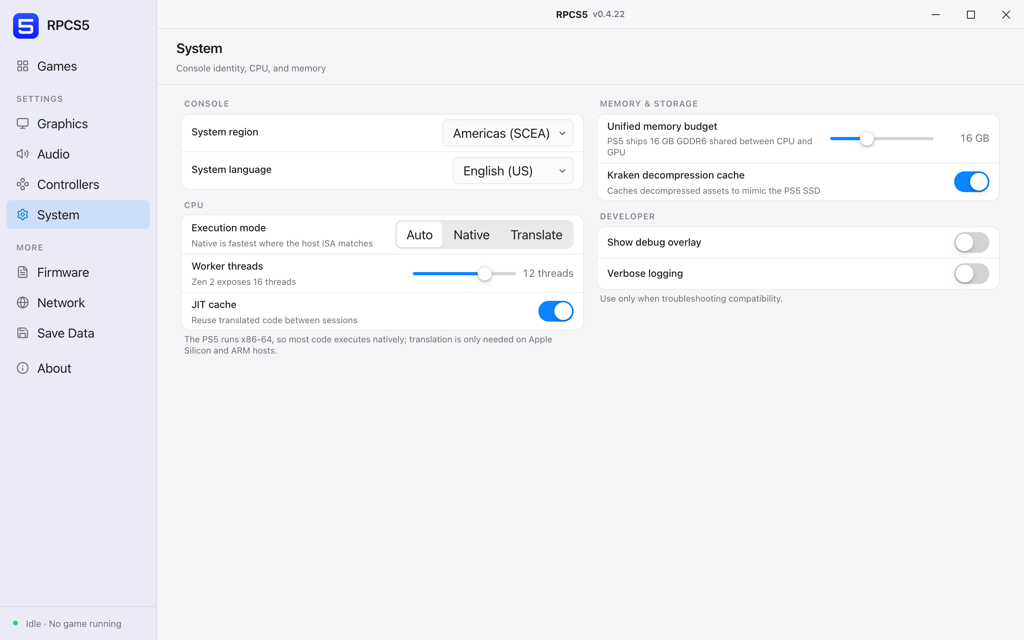
The PlayStation 5 runs an x86-64 CPU, which is the reason this emulator exists at all in a usable state: on a PC, most guest code can execute directly rather than being translated instruction by instruction. The CPU section below is mostly about how much of your machine to hand over, not about how to make translation faster.
Console
What the guest sees when it asks the console about itself. Region is the one that changes behaviour rather than presentation.
- System regionAmericas (SCEA), Europe (SCEE), Japan (SCEJ), Asia
Region reported to the guest.
Match the disc. A mismatch usually shows up as a title refusing to start rather than as a language problem.
- System language
Language reported to the guest.
- Console nickname
Name the guest uses for this machine.
CPU
- Execution modeAuto, Native, Translate
Native is fastest where the host instruction set matches.
Auto. It resolves to native on any x86-64 host and to translation on Apple silicon, which is the correct answer in both cases.
- Worker threadsUp to the thread count of your CPU
Threads available for recompilation and background work.
Leave two or three threads for the operating system. Handing over every thread you own makes the whole machine less responsive without making the emulator faster.
- JIT cacheOn / off
Reuse translated code between sessions.
On. Same argument as the shader cache: pay the cost once.
The PS5 runs x86-64, so most code executes natively. Translation only comes into play on Apple silicon and other ARM hosts.
Memory and storage
- Unified memory budgetUp to 16 GB
The PS5 ships 16 GB of GDDR6 shared between CPU and GPU.
Leave it at 16 GB. Lowering it does not reduce host memory use in any useful way, it just makes the guest allocator fail sooner.
- Kraken decompression cacheOn / off
Caches decompressed assets to mimic the PS5 SSD.
On if the emulator lives on an SSD. On a mechanical drive it can make streaming hitches worse rather than better.
Developer
- Show debug overlayOn / off
Draws internal counters over the game.
- Verbose loggingOn / off
Writes a much larger log file.
Use only when troubleshooting compatibility. Verbose logging is what a bug report needs attached to it, and it is also slow enough to change the behaviour you are trying to report.