
Audio
This guide outlines the various audio settings available in the RPCS5 PS5 emulator, offering explanations and suggestions for each option to help you optimize your audio experience.
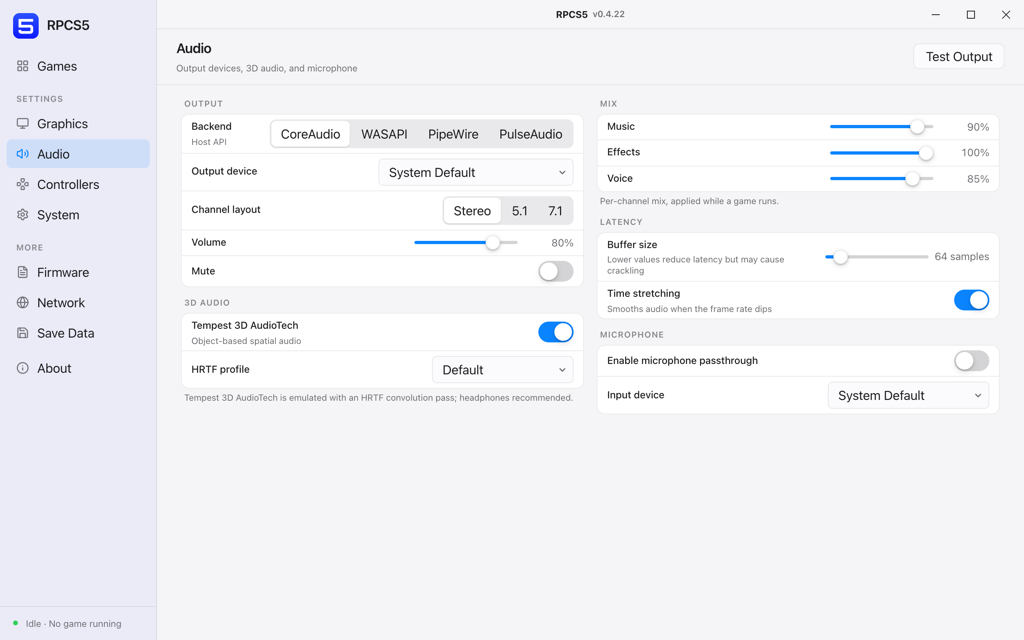
The exception is buffer size. Crackling audio almost always means the CPU is missing its deadline, so raising the buffer hides a performance problem rather than fixing one. If you find yourself pushing it past a few hundred samples, the answer is probably in the Graphics or System panel instead.
Output
- BackendCoreAudio, WASAPI, PipeWire, PulseAudio
Host audio API.
The emulator preselects the right one for your platform. Only change it on Linux, where PipeWire and PulseAudio can both be present and one of them is usually better behaved.
- Output deviceSystem Default or a specific device
Where audio is sent.
- Channel layoutStereo, 5.1, 7.1
Speaker configuration reported to the game.
Match what you physically have. Reporting 7.1 to a game while listening on stereo headphones sends dialogue to channels that get folded down badly.
- Volume0% to 100%
Master output level.
- MuteOn / off
Silences all output without changing the volume.
3D audio
- Tempest 3D AudioTechOn / off
Object-based spatial audio.
On for headphones, off for speakers. On speakers the HRTF pass is fighting the room instead of helping.
- HRTF profileDefault or a loaded profile
Head-related transfer function used for the spatial mix.
Tempest 3D AudioTech is emulated with an HRTF convolution pass, so headphones are strongly recommended.
Mix
Per-channel levels, applied live while a game runs.
- Music0% to 100%
Soundtrack bus.
- Effects0% to 100%
World and UI sound effects bus.
- Voice0% to 100%
Dialogue bus.
Latency
- Buffer size32 to 2048 samples
Lower values reduce latency but may cause crackling.
Start at 64 and raise it if you hear crackling. Crackling here is a symptom of the CPU missing its deadline, so it often goes away when you fix a frame rate problem instead.
- Time stretchingOn / off
Smooths audio when the frame rate dips.
On. Without it, a frame rate dip turns into audible pitch wobble rather than a slightly stretched sample.
Microphone
- Enable microphone passthroughOn / off
Exposes a host microphone to the guest.
- Input deviceSystem Default or a specific device
Capture device.