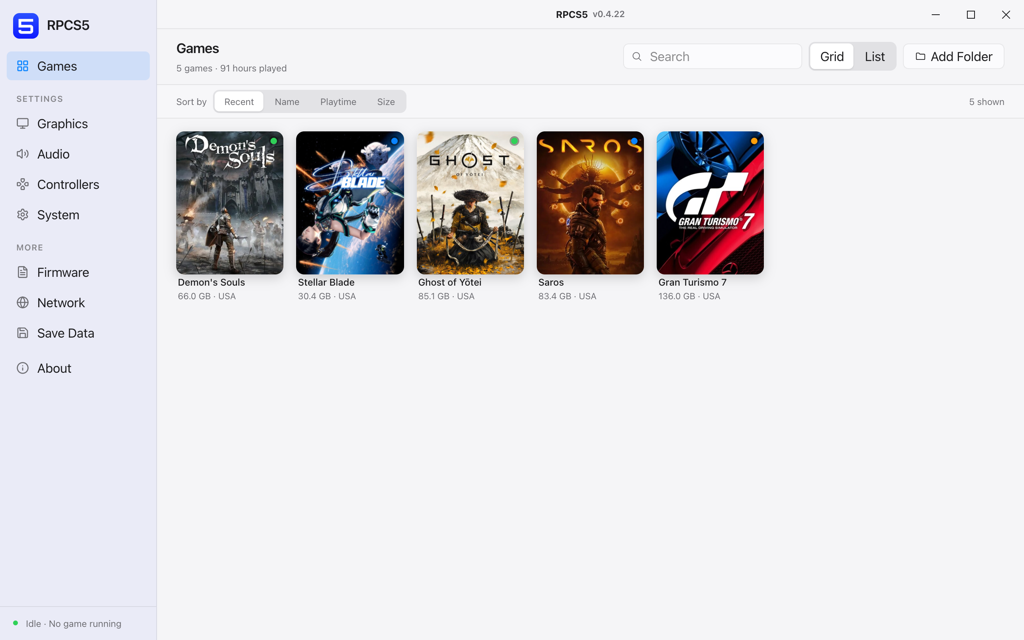
RPCS5 is an experimental, multi-platform, open-source PS5 Emulator and debugger written in C++. It is designed to run on Windows, Linux, and macOS. The goal is to accurately emulate PS5 & PS4 games, leveraging reverse engineering. It handles the complexity of the PS5's architecture and instructions by using advanced virtualization with methods like dynamic recompilation and JIT compiling.
Making PlayStation 5 games more accessible on PC with PS5 Emulator.
The aim is to make PS5 games more accessible on the PC platform, with multiple operating system support and a wide range of hardware.
More control over graphics.
RPCS5 gives you more control over how your PS5 and PS4 games visually look and run. You can push resolutions higher than the console, tweak frame rates, and add visual improvements that make games look more appealing. It's all about tailoring the experience to match your PC's power and what you actually want from your games.
Library on the go.
With PS5 Emulator you can finally bring add PlayStation exclusives to your gaming collection. No more switching between systems, your PS5 favorites work work with your PC. It's great for people who want multiple system, especially when traveling with a gaming laptop.
Advanced features.
RPCS5 unlocks features that are more flixible than a PS5. Record clips without storage limits, stream directly through OBS, use save states to jump around in games, and even run mods or community patches. These tools transform how you interact with games, giving you a superior control.
Extended controller support.
Not only just DualSense controllers, RPCS5 PS5 Emulator works with practically any controller you throw at it, plus full keyboard and mouse support with proper customization options. Whether you're more comfortable with an Xbox controller or prefer the precision of mouse aiming, you can play exactly how you want.
See RPCS5 in action
A look at PS5 emulator running on PC with real gameplay.
Demon's Souls - Smooth Gameplay @60FPS
System Requirements
RPCS5 PS5 Emulator performance is very sensitive to hardware configuration. For the best experience, we highly recommend meeting or exceeding the requirements outlined in the table below. Please note that while lower-end systems may be able to run the emulator, optimal performance cannot be guaranteed.
ComponentMinimumRecommended
Processor
MinimumAny x64 8-core Intel/AMD CPU
Recommended8-cores and 16-threads or more, AMD Zen 3 or newer, Intel Alderlake or newer
CPUs without AVX512 and less than 8 cores may run poorly.
Vulkan compatible. AMD Polaris or NVIDIA Pascal architecture at minimum, AMD Navi or NVIDIA Turing recommended.
Memory
Minimum8 GB
Recommended16 GB dual-channel or more
8 GB is the absolute minimum. Dual-channel is highly recommended over single-channel.
Storage
MinimumSSD/HDD for emulator and games
RecommendedSSD for emulator, SSD/HDD for games
1024 MB for base emulator data, 8 GB for cache, 512 MB per game.
Frequently asked questions
The most common questions about setup, compatibility and stability.
What steps do I need to take to start using RPCS5?
RPCS5 emulator is ready for general use by currently, its at an beta stage and it is under heavy development. Check Quickstart Guide and Documentation with detailed step-by-step guides on how to begin using RPCS5.
Does RPCS5 support local multiplayer gaming?
RPCS5 supports full local multiplayer for up to 4 controllers at once, just like the original PlayStation 5 hardware. Multiplayer controller configurations are supported.
Which PS5 accessories are currently compatible with RPCS5?
Currently, support for PlayStation 5 peripherals in RPCS5 is limited but expanding. More devices will be added in future updates. Please ensure checking back with updates for information on the most recent compatibility.
Is it possible to play directly from a PS5 game disc?
RPCS5 can natively read game data directly from your PlayStation 5 game discs, however installation of your game files with a compatible Blu-ray drive is required. Details of compatible drives can be found in the Quickstart Guide.
How reliable is RPCS5 in its present development stage?
RPCS5 isnt stable enough to just boot up and play a fair number of games. The stability varies from game to game and may get affected by updates and implementation of new features. We will shortly release the first beta. This assures that the development team is devoted to preserving and improving stability.
How can I obtain PlayStation 5 games for RPCS5?
Only the original PlayStation 5 disks will work on a compatible Blu-ray disc drive. This procedure is the safest method to run your games on a computer.
Why does the development team prioritize certain games over others?
The RPCS5 development team is dedicated to enhancing the emulator, rather than enhancing specific games. This approach aligns with their goal of creating an accurate PlayStation 5 emulation without game-specific hacks. As a result, updates to the emulator itself benefit all games, improving overall compatibility and performance.
What types of input devices are compatible with RPCS5?
RPCS5 Emulator supports both keyboard and mouse inputs and DualShock 4, DualSense controllers natively; many third-party controllers are also supported. Moreover, in the near future, there is a planned support for many more input devices.
What is the process for dumping PlayStation 5 games?
Dumping PlayStation 5 games or PKGs over a Blu-ray drive is not possible. Please refer to the Quickstart Guide for this. This feature is not implemented in the emulator to prevent illegal activity.
Is it possible to transfer save data from a real PS5 to RPCS5?
Save data can be transferred from a real PlayStation 5 into RPCS5 using a USB flash drive. Some saves will need to be re-signed, as the PlayStation 5 has a user account system. This feature will come soon. For more on managing your saves, see the Quickstart Guide.
Can RPCS5 users play online with real PS5 consoles or other emulator users?
It currently does not have any online feature for multiplayer. Full integration, including playing games with real PlayStation 5 consoles, needs a lot of development and doesnt have a high priority until RPCS5 becomes more stable and accurate.
How should I report issues or provide feedback about RPCS5?
It can be submitted through our GitHub Issue Tracker for development-related issues or to the Forums for general inquiries and discussions. Make sure that your submissions follow guides about reporting issues.
Check the compatibility list
This list is constantly updated as more games are tested while the emulator is improved. Bookmark it and check back often to see the status of playability of a particular game.